XERIOSEP 3
What if you could create your own color separation software? Whether it’s a quick on‑the‑fly adjustment, refining your work with subtle fine‑tuning, or diving into a complex, multi‑color project, XERIOSEP 3 is always the answer
 Inks and solutions
 Printing machines
 Printing Software
 Training center
CHOSEN BY PROFESSIONALS
XerioSEP software has become the first choice of professional printers and screen printers around the world, who particularly appreciate it for its speed, power and precision. Designed to be compatible with the latest computer technology, it is a complete image separation tool, integrated on macOS.
PERFORMANCE AND POWER
Xeriosep software is NOT a Photoshop plugin. Being a stand-alone software, it allows the opening of large images for advanced color separation.
- File TIFF, JPG, PSD, PSB
- Color profile RGB, CMYK
- Color profile MULTICHANNEL
- o Real time editing
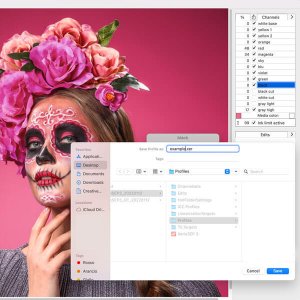
CREATE YOUR OWN COLOR SEPARATION
Not just a simple automatic separation program.
With XerioSEP you can create your own separation method using your colors and your settings for each image.
Freely create and edit. Save your settings for further processing
- Multiscript automatic separation
- Manual separation by setting the real colors of the file
- Select the number of colors you need
- Edit the various default separations
- Create your own color separation with your colors
- Add, cancel and edit every color in a selective way

SIMULATION DIGITAL PRINTING ON FABRIC
Thanks to the possibility of importing color profiles ICC Multichannel you can make a separation for print with the same percentage and characteristics of the digital file.
By exporting the ICC printer profile, you can recreate the same color separations that the printing rip creates in the file digitally printed.
Corrections and dotgain curves can easily be added before exporting.
Another feature is the possibility to simulate the digital halftone in in print using the stochastic screening of the software XERIO RIP that allows uniform shades without moiré.
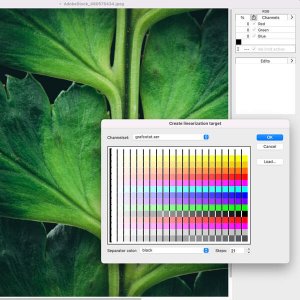
MAKE PROFESSIONAL FILES FOR PRINT
In addition to a thorough color separation, you need to create a file suitable for screen printing.
Processing efforts are often jeopardized by little control of the printing situation.
XerioSEP can generate a measurable color TARGET using every single printing script generated, whether CMYK, CMYK + Spot color and up to 12 separation colors.
- compensation DOT GAIN
- INK LIMIT balance
- Curve function
- Select every single part of the image and accurately change the color percentage of every ink used in the separation